Every way Ambient Desktop gains a new tool falls into one of four install classes, each with a visible permission profile and an uninstall path; a Capability Builder covers jobs the catalog does not. The marketplace direction is curated and legible, not a raw feed of arbitrary executable code.
How capabilities stay accountable#
Plugins are how an agent grows, and how supply-chain risk usually enters one. Ambient Desktop's answer is legibility: every capability has a known class, the permissions it runs under are visible, and you can inspect, validate, repair, and remove it. The Plugin Manager is where that state lives.
The marketplace is curated: a default capability is selected, described, pinned, sandboxed, and validated before it becomes an easy install path. Curated defaults covers that catalog and the pipeline behind it.
The install classes#
What you can add falls into four classes, ordered by how much trust each one asks for. The class tells you how it is contained.
Four install-class columns ordered left to right by how much trust each asks for, rising like a ladder. Curated defaults: reviewed MCP capabilities with a ToolHive runtime, contained by being pinned and sandboxed. Pi packages: sandboxed tools for one job, with no privileged host access. Custom MCP servers: your own server by descriptor, contained by a one-time trust prompt and an MCP permission policy. Privileged packages: anything wanting lifecycle hooks, native dependencies, or host mutation, contained by explicit privileged review. An axis beneath runs from lowest friction to highest review.
| Class | What it is | How it is contained |
|---|---|---|
| Curated defaults (lowest friction) | Reviewed MCP capabilities with ToolHive runtime boundaries, the safe common path, covered in curated defaults | Pre-vetted, pinned, and sandboxed; still installed behind user approval, with diagnostics and an uninstall path |
| Pi packages (narrow tools) | Sandboxed, tool-shaped extensions for a specific job | Kept separate from privileged host access |
| Custom MCP servers (bring your own) | Your own MCP server by descriptor: command, args, environment | First use triggers a one-time trust prompt, then it runs under an MCP permission policy |
| Privileged packages (highest review) | Anything wanting lifecycle hooks, native dependencies, or host mutation | Explicit privileged review before it runs |
Custom MCP servers and privileged packages run under an MCP permission policy after their trust prompt; you can see and change that policy, and uninstall the plugin, from the Plugin Manager. How those policies are enforced at runtime is the security model.
The Plugin Manager#
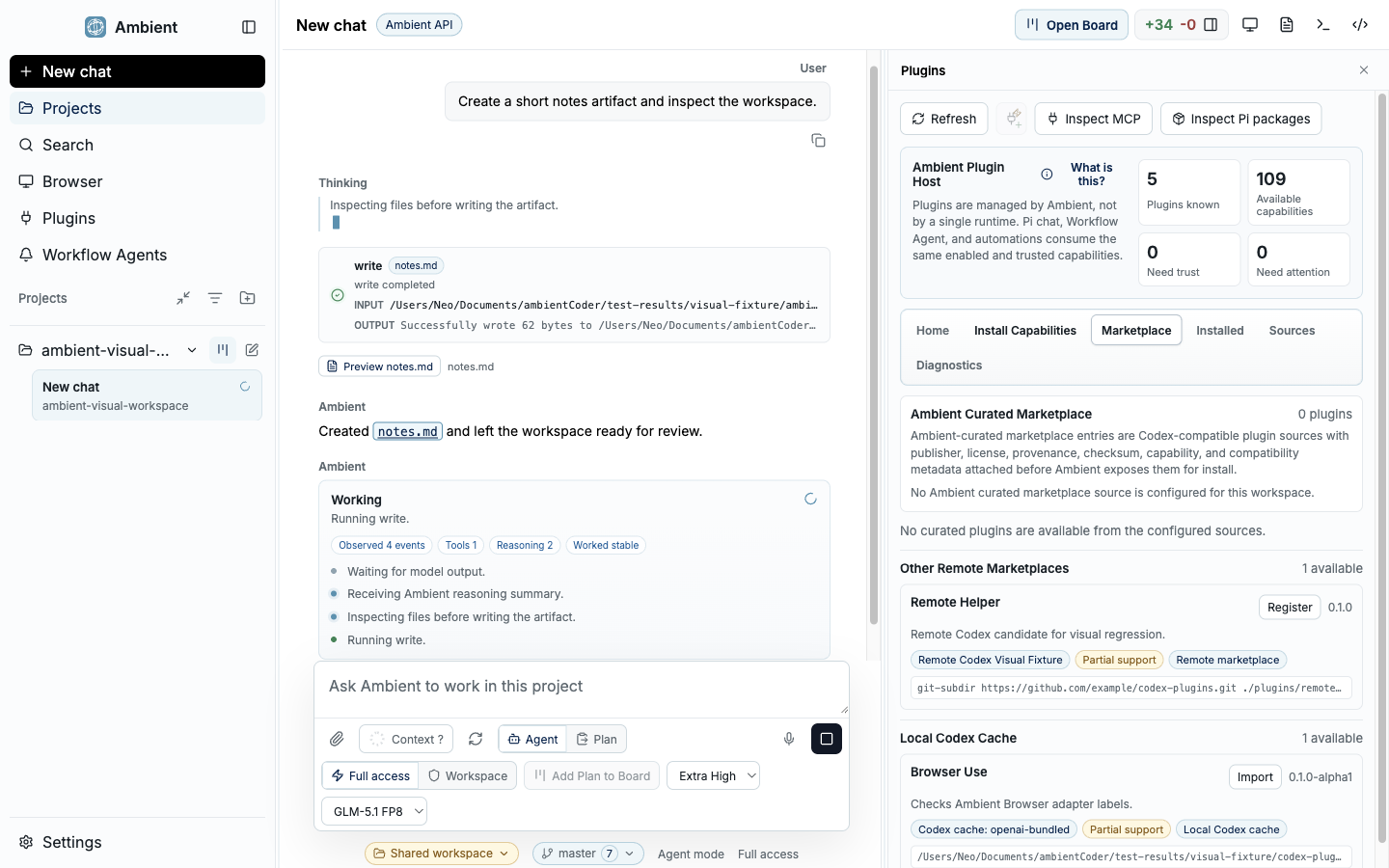
The Plugin Manager is the single surface for installed capability state: the curated defaults, what is installed, and where each capability's trust boundary sits. Per capability you can:
- Read the permission policy it runs under, and change it.
- Preview and validate it before you depend on it.
- Repair a broken install, update it, or re-register it after a change.
- Remove it.
Build your own capability#
When the catalog does not cover a narrow, repeatable job, the Capability Builder turns it into a first-class capability instead of a brittle prompt. You describe:
- the provider it wraps,
- its locality: local, network, or either,
- the outputs you expect,
- any secrets it needs.
Ambient turns that into an installer-friendly descriptor.
Generated capabilities expose their command contract, dependency approvals, and secret requests up front; they can be previewed, validated, repaired, updated, re-registered, and removed from the Plugin Manager; and they run under the same MCP permission policy as any other capability. Building it yourself earns it no special trust.
Worked example: a Hacker News digest#
Suppose you want a repeatable way to see the front page of Hacker News without re-typing the request each time. Turn it into a capability once, then call it whenever you like.
Describe it in Plugin Setup#
Open Plugin Setup, choose Create capability, and describe the job in plain language:
Create a skill that captures the top stories on Hacker News and prints them for the user.Set the contract#
Mark it as a network capability (it reads a public site), declare the output (a ranked list of titles, points, and links), and confirm it needs no secrets. Ambient turns that into an installer-friendly descriptor.
Review the generated descriptor#
Before anything runs, the descriptor shows its command contract, any dependency approvals, and that it requests no credentials. Reading a public page still passes through the same permission and isolation boundaries as any other capability. See browser and scraping safety.
Validate once#
Run it a single time to confirm the output shape. You should get the current top stories with their titles, scores, and links: proof it works before you depend on it.
Invoke it anytime#
From then on, call it like any reviewed tool ("Run my Hacker News digest") and it prints the current front page. Update, re-register, or remove it from the Plugin Manager whenever you want.
Where the marketplace is headed#
Today the experience is a curated catalog plus your own local additions. The roadmap is a hosted storefront for reviewed Web2 and Web3 capabilities built on Ambient, with signing, checksums, and provenance policy, so that breadth arrives without giving up the trust posture.
FAQ#
What happens the first time a plugin runs? Custom and imported plugins trigger a one-time trust prompt and then run under an MCP permission policy. You can see and change that policy, and uninstall the plugin, from the Plugin Manager.
Can I add a plugin that is not in the catalog? Yes. Import a custom MCP server by descriptor, or build one with the Capability Builder. It runs through trust and permission review rather than arriving pre-vetted.
Keep going#
- Curated defaults: the reviewed, sandboxed capabilities that cover the common path
- Security model: how contained capabilities actually run
- Local visual analysis: a built-in capability that stays on your machine